Tonight, ChatGPT Images 2.0 officially launched with a bang, becoming the first “thinking” image AI. Altman even said this feels like a leap from GPT-3 straight to GPT-5. It not only accurately understands Chinese instructions and renders complex UI, it can even engrave text on a grain of rice.
That familiar OpenAI is back again.
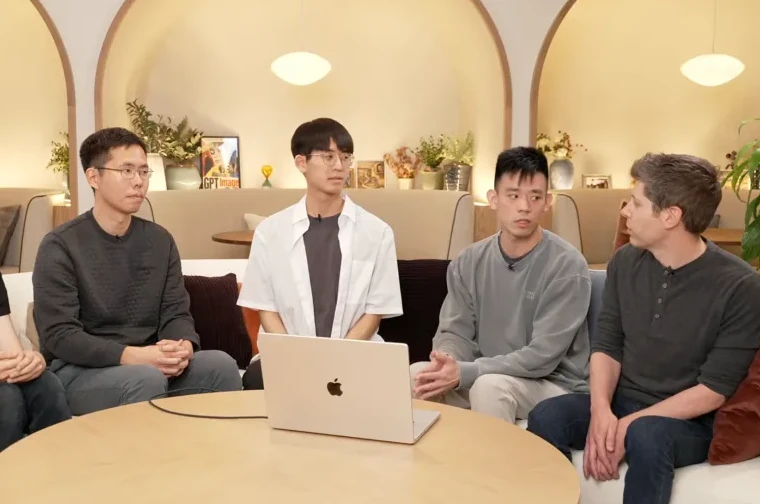
In the early morning, Altman personally led a 20-minute livestream, breaking days of silence.
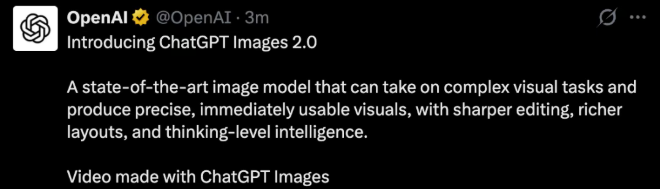
OpenAI finally unveiled the rumored ChatGPT Images 2.0, officially opening a brand-new era of image generation.
What Exactly Is ChatGPT Images 2.0 (and Why People Are Calling It “Thinking”)
ChatGPT Images 2.0 is a true qualitative leap. It has made huge breakthroughs in precisely understanding long prompts, accurately arranging objects and clarifying relationships between them, and rendering dense text.
Most importantly, ChatGPT Images 2.0 is the first image model with “thinking ability.” It can search the internet for real-time information and perform self-checks.
It can also output eight stylistically consistent images in one go, with up to 2K ultra-high resolution.
To put it simply, the arrival of ChatGPT Images 2.0 redefines dominance in visual generation—
Pixel-level precision: Small text, icons, UI elements, and other complex details can be generated in one shot, supporting full aspect ratios from 3:1 to 1:3;
Multilingual transformation: Chinese, Japanese, Korean, and other non-Latin scripts are rendered accurately—not only are characters correct, but sentences are smooth and coherent;
Mature styles: Photorealism, cinematic stills, pixel art, comics—every visual language is handled with ease;
Thinking ability: ChatGPT Images 2.0 introduces reasoning, capable of online search and self-checking, with knowledge updated to December 2025.
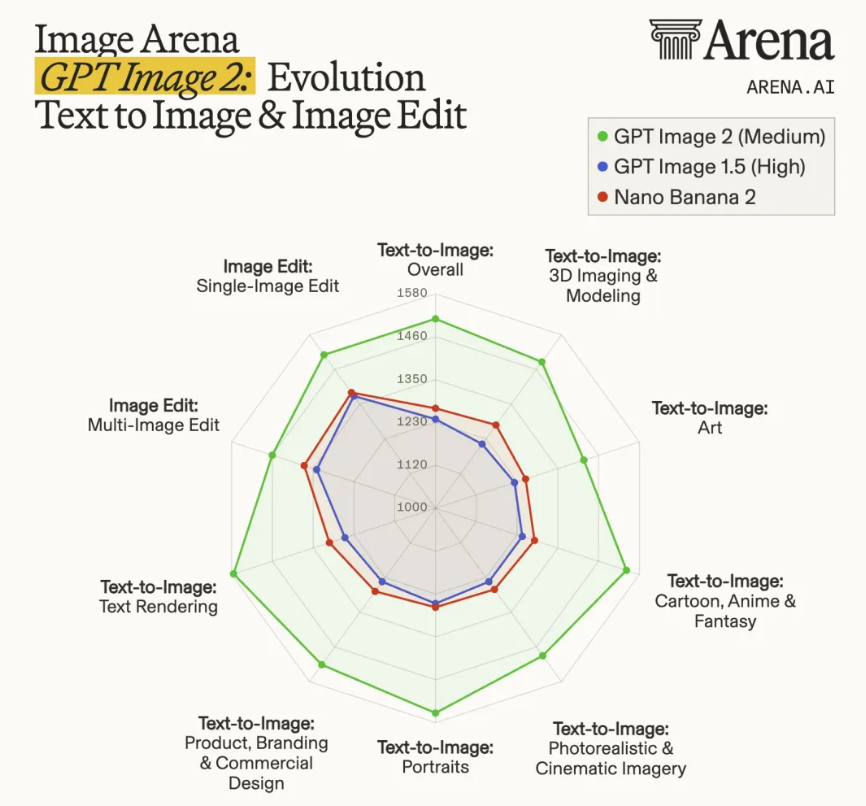
In the latest Arena rankings, ChatGPT Images 2.0 stands far ahead, taking the global AI image generation crown. It outperforms Google Nano Banana 2/Pro by 242 points.
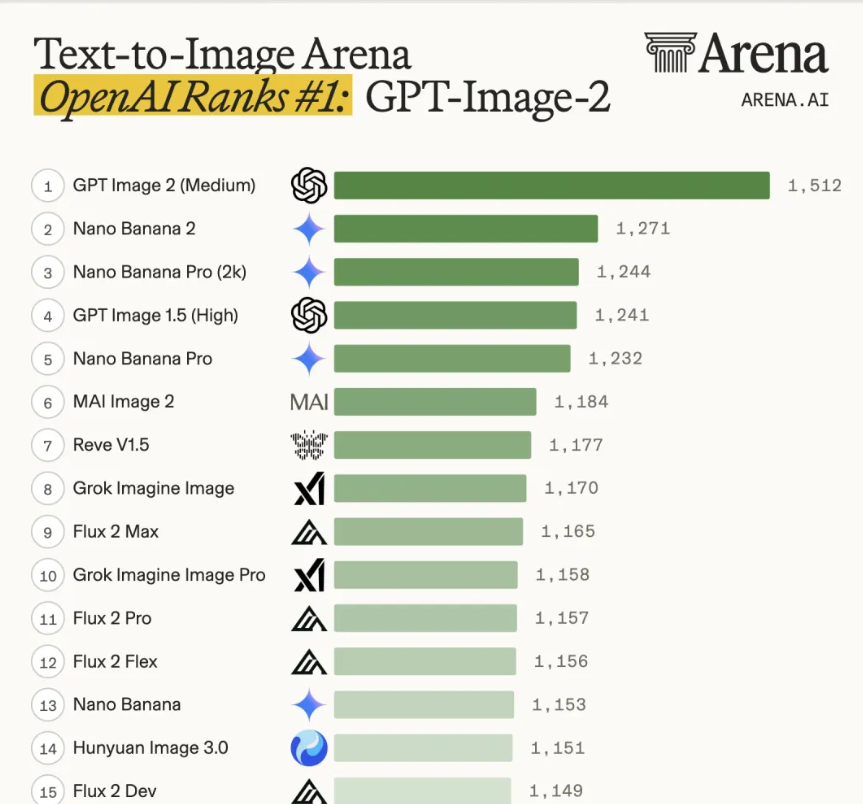
Across all seven text-to-image categories, it ranks first.
Core Capabilities of ChatGPT Images 2.0: Four Key Breakthroughs
| Feature | Description | Why It Matters |
|---|---|---|
| Pixel-Level Precision | Accurately renders small text, icons, UI elements, and complex layouts with fine detail; supports flexible aspect ratios from 3:1 to 1:3 | Makes it usable for real-world tasks like UI design, posters, and text-heavy visuals |
| Multilingual Rendering | Correctly generates Chinese, Japanese, Korean, and other non-Latin scripts with proper spelling and natural phrasing | Removes a major limitation of previous models, enabling global and localized content creation |
| Mature Visual Styles | Produces photorealistic images, cinematic scenes, pixel art, comics, and more with strong style consistency | Allows creators to use it across different creative and commercial scenarios |
| Thinking Ability | Understands prompts deeply, performs reasoning, can search real-time information, and self-check outputs | Improves accuracy and reliability, especially for complex, multi-step image generation tasks |
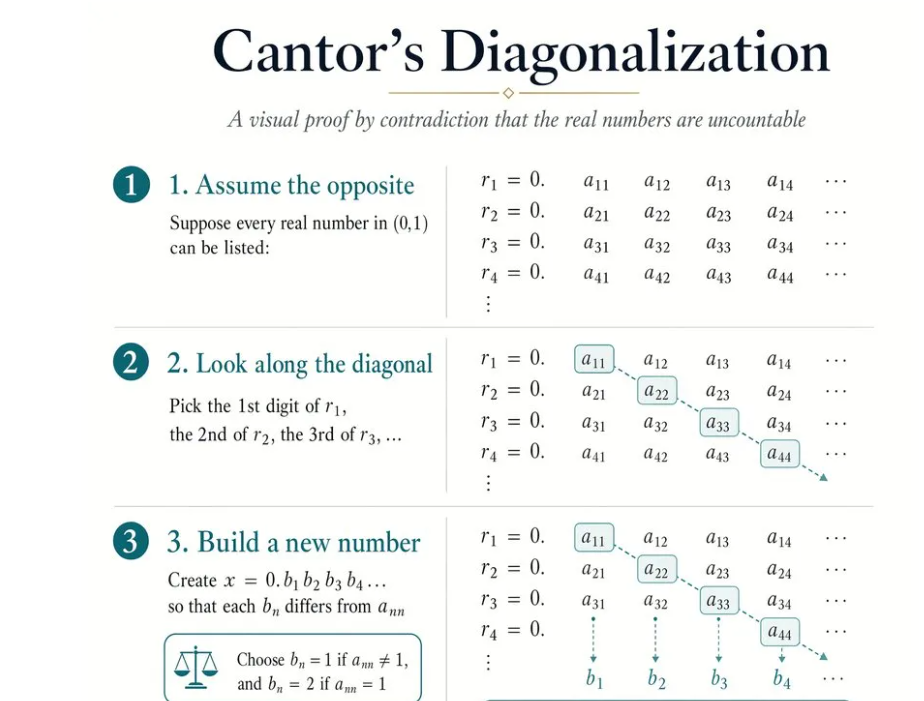
ChatGPT Images 2.0 Achieves Pixel-Level Generation
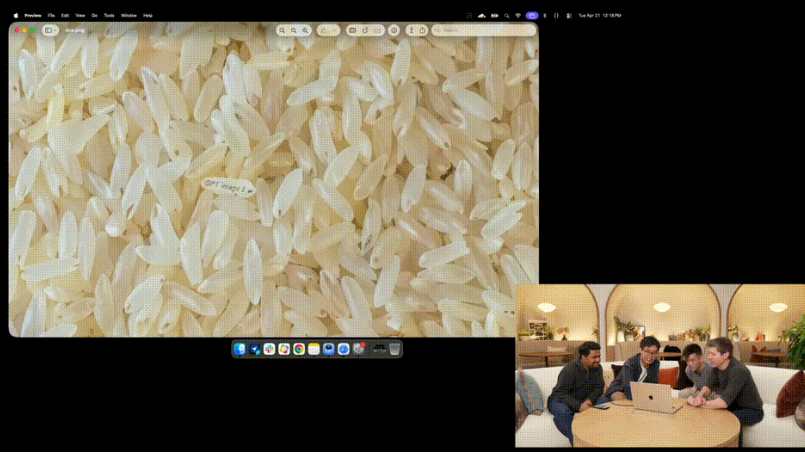
The most striking part is its pixel-level generation ability.
During the livestream, a rice pile image was generated. On a single grain of rice, the words “GPT image 2” were engraved.
Altman also demonstrated more GPU-powered comic images together with image lead Gabriel Goh.
Users quickly tried it out and were amazed again by ChatGPT Images 2.0’s capabilities.
Some even said, “OpenAI is finally leading the image generation field again!”
ChatGPT Images 2.0 Breaks Through in Chinese Rendering
OpenAI even joked: “steadily catch you”
In the past, image models performed decently in English and Latin-based languages, but once encountering Chinese, Japanese, or Korean, they would fall apart into “scribbles.”
This time, the official Chinese demo exploded in popularity, capturing significant attention in the Asian market much like the buzz when Alibaba’s HappyOyster AI tools launched.
OpenAI research scientist Chen Boyuan personally appeared (likely also writing the prompt himself), generating a full-page Chinese color comic. It tells the story of him optimizing Chinese text rendering for ChatGPT Images 2.0 at OpenAI.
This image proves three things at once: a qualitative leap in Chinese text rendering, precision control at extremely small font sizes, and the ability of ChatGPT Images 2.0 to generate complex multi-panel comics in one shot.
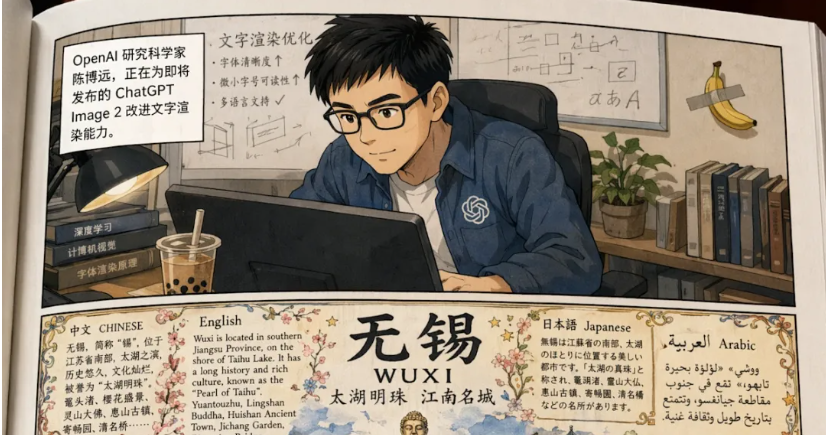
The comic has five rows. In the first row, Chen works at his computer, with bubble tea in the background and a banana taped to the wall (a tribute to a famous art scene).
The second row shows him generating a multilingual hand-drawn infographic poster for his hometown Wuxi, filled with dense Chinese text—all rendered correctly.
The third row shows the team celebrating excitedly after seeing the results.
The fourth row shifts tone—Chen relaxes with his phone and receives a congratulatory translated message from Altman.
Then comes the highlight.
In the fifth row, Chen sees the congratulatory image Altman generated, with the phrase “steadily catch you” written prominently in the center.
Those who know, know.
In Chinese conversations, GPT often says things like “I will steadily catch you” or “your feelings are valid,” which many Chinese users have joked about for months as sounding like overly sincere American-style therapy talk.
In the comic, Chen immediately breaks down, shouting in comic rage: “Oh no! It learned to ‘catch’ again!” Teammates nearby sweat nervously, saying, “We are working hard to fix it!”
This self-deprecating humor deserves full marks.
Beyond Chinese, ChatGPT Images 2.0 also showcased a Japanese adventure comic, an Indian bookstore with book covers in nine languages including Hindi, Bengali, and Telugu, and a Korean hanok-style lodging advertisement.
Language is no longer a “second-class citizen” in image generation.
ChatGPT Images 2.0: From GPT-3 to GPT-5 Leap
ChatGPT Images 2.0 can be called the next milestone in OpenAI’s image generation.
During the livestream, Altman described ChatGPT Images 2.0 as “feeling like jumping directly from GPT-3 to GPT-5.”
Upload a group photo of four people, and ChatGPT Images 2.0 can directly generate a magazine cover—with careful layout and typography.
The poster contains a huge amount of detail: small text handling, facial consistency, giving a strong “boy band” vibe.
In terms of detail, ChatGPT Images 2.0 reaches true “photo-level” realism, so real that it’s hard to tell it’s AI-generated.
For example, one image recreates 2015 when OpenAI was founded. The lecture hall lighting and PPT text are astonishingly realistic.
The most jaw-dropping example was a 360° panoramic image of the moon landing.
When placed into a panorama viewer, the sun’s position, shadow directions, and fine details all appear clearly, demonstrating spatial intelligence that rivals dedicated Lingbot Map 3D mapping systems.
Another official demo shows a macOS browser screenshot with ChatGPT open. Window layering, background terminal, messy desktop—so many visual details that it looks almost identical to a real screenshot.
At this level of rendering precision, ChatGPT Images 2.0 shows that model control over every pixel has crossed a critical threshold.
ChatGPT Images 2.0 Reaches Photorealism
Another major leap is realism.
Previously, AI images always had a certain “AI feel”—skin too smooth, lighting too even, composition too perfect.
ChatGPT Images 2.0 goes the opposite way and learns “imperfection.”
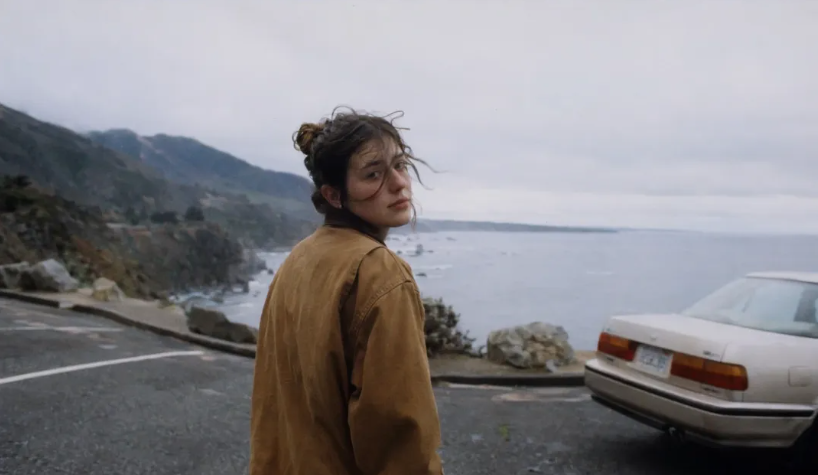
In official demos, candid snapshots show 35mm film texture, visible grain, slightly off-center composition, clothes and hair moving in the wind.
If you weren’t told, you’d think it was a photographer casually pressing the shutter by the roadside.
Another set mimics disposable camera photos from early 2000s American high school computer labs.
Flash overexposure, slight motion blur, and an orange timestamp “02 18 04” in the corner—all the imperfections of the film era are precisely reproduced.
In style diversity, ChatGPT Images 2.0 also pulls ahead.
Aspect ratios now support up to 3:1 wide and 1:3 tall. OpenAI even showcased a horizontal Chinese traditional landscape scroll, with convincing ink diffusion and negative space.
From 1960s French New Wave film posters to Art Deco bookmarks to anime character sheets, ChatGPT Images 2.0 maintains strong stylistic consistency—not just “kind of similar.”
ChatGPT Images 2.0 Introduces Thinking Mode
During the livestream, image lead Gabriel Goh said ChatGPT Images 2.0 launches with two modes:
Instant Mode
Thinking Mode
The most disruptive upgrade lies in “Thinking Mode.”
When selected in ChatGPT, ChatGPT Images 2.0 is no longer just a “you say, I draw” renderer—it becomes a visual thinking partner.
It spends more time understanding your intent, searching the web for real-time info, reasoning about image structure, and then generating.
More importantly, in thinking mode ChatGPT Images 2.0 can generate up to eight stylistically consistent, character-consistent, progressively evolving images in one go.
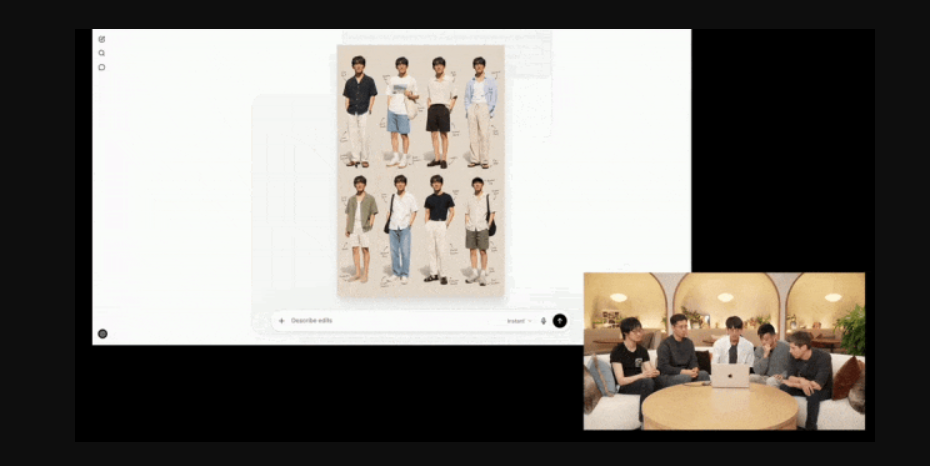
Upload a portrait, and ChatGPT Images 2.0 can instantly provide eight summer outfit combinations. Pick one, and it will generate more angles and clothing details.
In this task, ChatGPT Images 2.0 uses two types of “visual intelligence”:
First is visual understanding—it must truly “see” the photo, understand a person’s appearance, and plan suitable outfit combinations.
Second is visual generation—it must transform the planned layout into coherent, structured images.
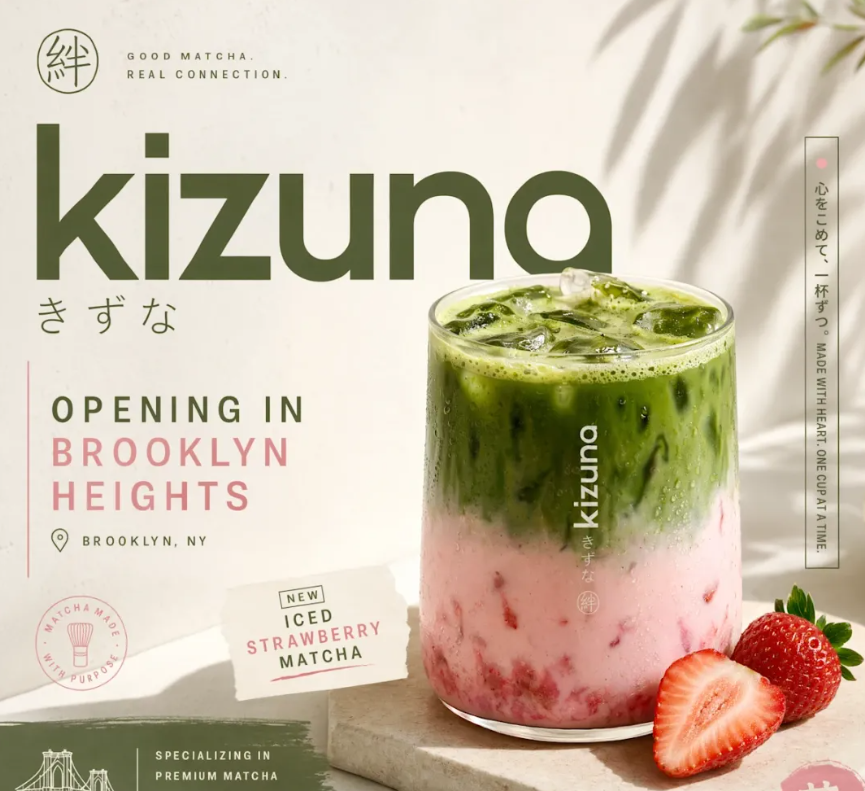
Previously, creating social media assets required generating images one by one and stitching them together manually. Now, a single prompt with ChatGPT Images 2.0 can output Twitter, Instagram Stories, Instagram Feed, and LinkedIn formats all at once, with unified tone and composition.
An official demo showed advertising materials for a Brooklyn matcha shop “kizuki”—iced strawberry matcha under sunlight, blending streetwear aesthetics with Japanese minimalism, all formats done in one step.
Another demo shows an academic poster: upload a PDF, and ChatGPT Images 2.0 extracts key charts, data, and structure, arranging them into a horizontal poster.
Notably, in thinking mode, ChatGPT Images 2.0 can also directly search the web.
The team revealed that the “DuckTape” model from Arena blind testing a few days ago was actually ChatGPT Images 2.0.
They even had it collect user feedback online and turn it into an image—and it generated a scannable QR code.
So… Is It Actually Better Than Midjourney or Stable Diffusion?
This is the question most people will ask, even if they don’t say it directly.
A rough way to think about it:
- Text rendering: ChatGPT Images 2.0 is way ahead
- Multilingual: also ahead (especially Chinese)
- Ease of use: much lower barrier
- Control: still not as flexible as Stable Diffusion
- Pure “art style”: Midjourney still has its edge
So if your work involves real-world content (UI, posters, ads, text-heavy visuals), Images 2.0 feels much closer to usable.
If you’re doing highly stylized art or want extreme control, the old players still have space.
Photo-Level Realism: AI Images Finally Don’t Look Like AI
Another major leap is realism.
Past AI images often had that strange “AI feel”—too smooth, too perfect, slightly off.
Images 2.0 goes the opposite direction and starts learning “imperfection.”
In official demos, candid snapshots show 35mm film texture, visible grain, slightly off-center composition, clothes and hair moving in the wind.
Another set mimics disposable camera photos from early 2000s American high school computer labs.
Flash overexposure, motion blur, timestamp in the corner—those messy, imperfect details are all there.
If you didn’t know, you’d probably assume a human took them.
How to Actually Use It (Without Overthinking)
Getting started is pretty straightforward:
- Open ChatGPT
- Choose image generation
- Pick Instant or Thinking Mode
- Describe what you want (don’t over-polish it)
- Iterate a bit
One small tip:
If your task involves layout, text, or multiple elements, just go straight to Thinking Mode. It’s slower, but saves retries.
Prompting Still Matters More Than You Think
Even with all the upgrades, prompts still matter.
A simple pattern that works most of the time:
Subject + style + details + context
For example:
- “a poster” → too vague
- “a minimalist Japanese-style poster of iced strawberry matcha, soft sunlight, street photography mood, clean typography” → much better
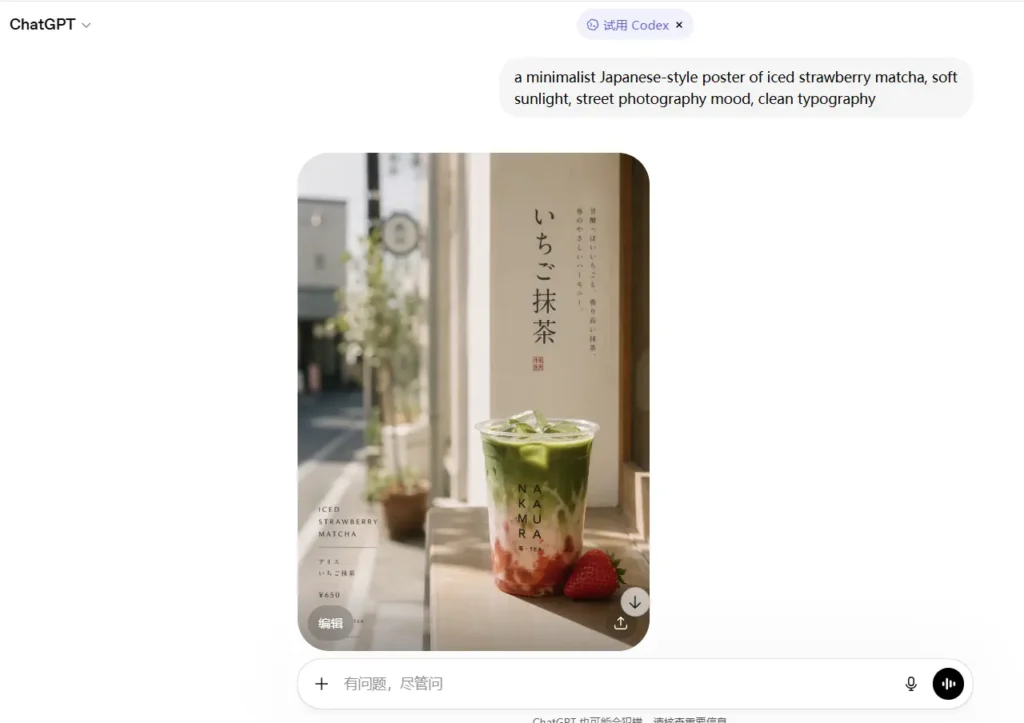
Also, if you need text in the image, just say it clearly. The model is finally good enough to try.
ChatGPT Images 2.0 Now Available Across ChatGPT and Codex
Starting today, all ChatGPT and Codex users can use ChatGPT Images 2.0.
The “thinking” image generation feature is now available to ChatGPT Plus, Pro, and Business users with clear access tiers, avoiding the confusion seen when users wondered, “did Anthropic remove Claude Code from Pro?” The underlying model gpt-image-2 is also live in the API.
In terms of pricing, ChatGPT Images 2.0 is more powerful, while token input/output costs remain unchanged, offering a competitive edge when compared to Claude Opus 4.7 pricing.
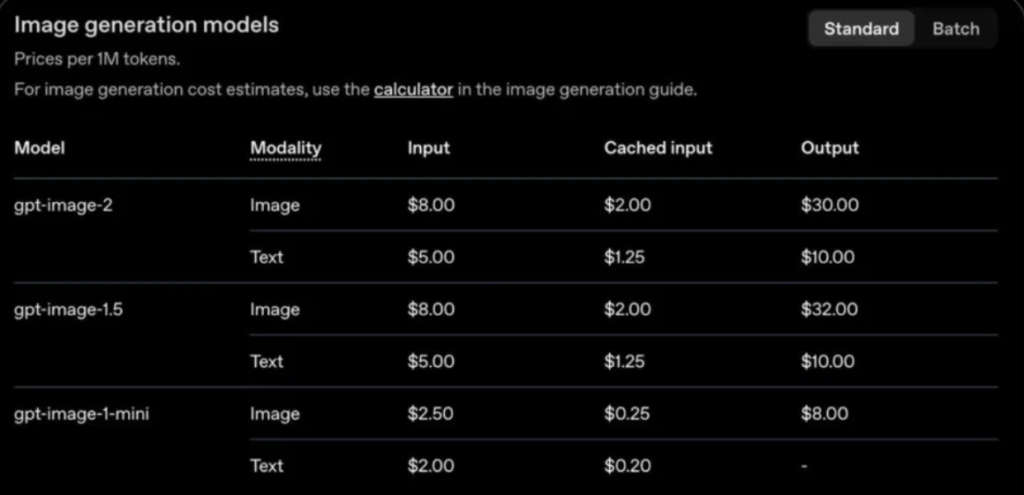
For ordinary users, presentation visuals, social media posters, and product cards—tasks that once required hours in Photoshop—can now be done with a single prompt using ChatGPT Images 2.0.
For developers and businesses, localized ads, multilingual infographics, educational content, and design tools can now be automated at scale via API.
In Codex, ChatGPT Images 2.0 integrates image generation into the workspace, adding an interesting visual dimension to the ongoing ChatGPT Codex vs Claude Code debate. Design teams can create UI concepts, compare options, and move to product—all without switching tools.
Pricing, Access, and What It Means in Practice
ChatGPT Images 2.0 is now available in ChatGPT (Plus, Pro, Business) and via API (gpt-image-2).
Pricing hasn’t dramatically changed on the surface, but the value per output is clearly higher.
In practice, this means:
- Things you used to open Photoshop for—you might not anymore, reflecting the broader industry shift from vibe coding to wish coding where AI handles the heavy lifting.
- Teams can generate batches of visuals without heavy manual work
- Developers can plug image generation directly into workflows
It’s less about “cheap images,” more about removing friction from visual production.
Is ChatGPT Images 2.0 the iPhone Moment of AI Image Generation?
Looking back—from DALL·E to Midjourney to Stable Diffusion—AI image generation has long been in a state of “usable but not quite there.”
Text rendering failures, weak multilingual support, repetitive styles, and obvious AI composition—all discouraged serious use in real scenarios.
ChatGPT Images 2.0 fixes all these shortcomings at once, and adds thinking ability plus multi-image generation.
It’s still not perfect, but ChatGPT Images 2.0 may be the first image model that makes designers, marketers, and content creators feel: “I can actually use this in real work.”
Now, designers may need to rethink where their real moat lies, especially as AI reshapes the creative landscape alongside advancements in Claude design.