Di recente, Antropico ha lanciato un nuovo prodotto chiamato Claude Design.

A prima vista, potrebbe sembrare solo l’ennesimo strumento di progettazione basato sull’intelligenza artificiale.
Ma il mercato ha reagito in modo diverso: i titoli di società come Figma, Adobe e Wix hanno subito un calo poco dopo.
Un prodotto ancora in fase di anteprima di ricerca ha sostanzialmente surclassato tutti i concorrenti nel settore dei software di progettazione basati sull'intelligenza artificiale.
Tre giorni prima del lancio, il 14 aprile, un certo Mike Krieger si è dimesso dal consiglio di amministrazione di Figma.
Chi è? È il cofondatore di Instagram, uno dei prodotti visivi di maggior successo mai realizzati.
E ora è a capo del team che sta realizzando il progetto Claude Design.
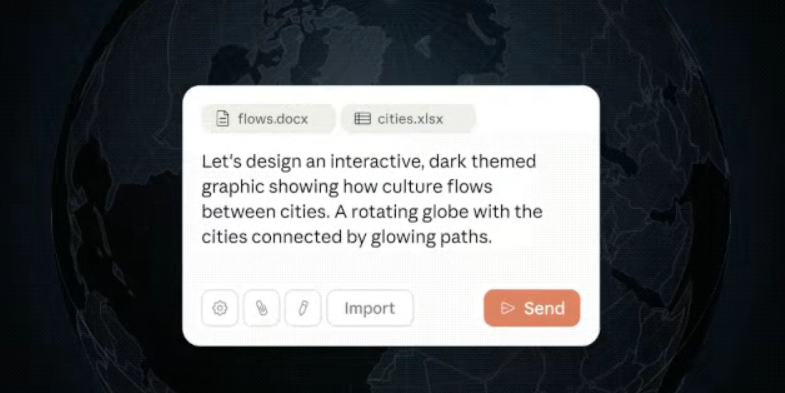
Ma cosa ha fatto esattamente Claude Design per suscitare una reazione così forte da parte del mercato dei capitali?
Cosa fa realmente Claude Design
Basta chattare con Claude Design, che sarà in grado di generare:
Pagine social dinamiche con Claude Design

Siti web completamente interattivi con Claude Design
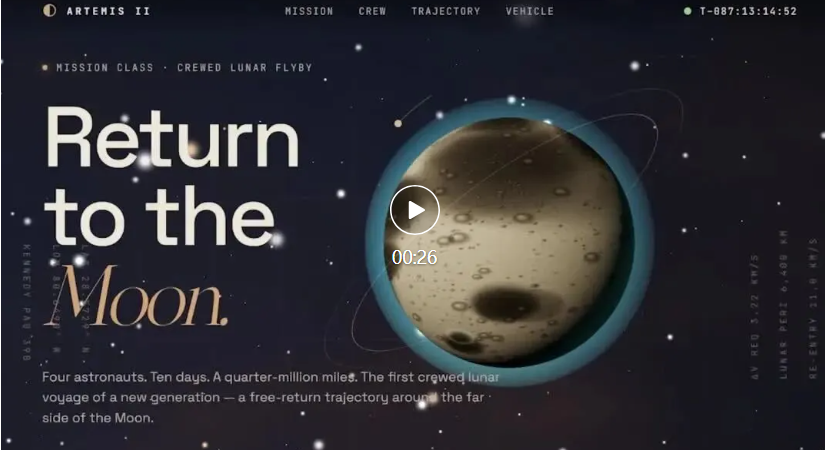
Un video promozionale completo del prodotto realizzato con Claude Design

In parole povere, basta descrivere in modo semplice ciò che si desidera — un prototipo di app, una presentazione PowerPoint, una landing page di marketing, un wireframe di prodotto — e Claude Design genera direttamente una bozza di progetto interattiva.
Cliccabile, scorrevole, interattivo: non è affatto uno screenshot statico. E, onestamente, l’estetica è incredibilmente bella…
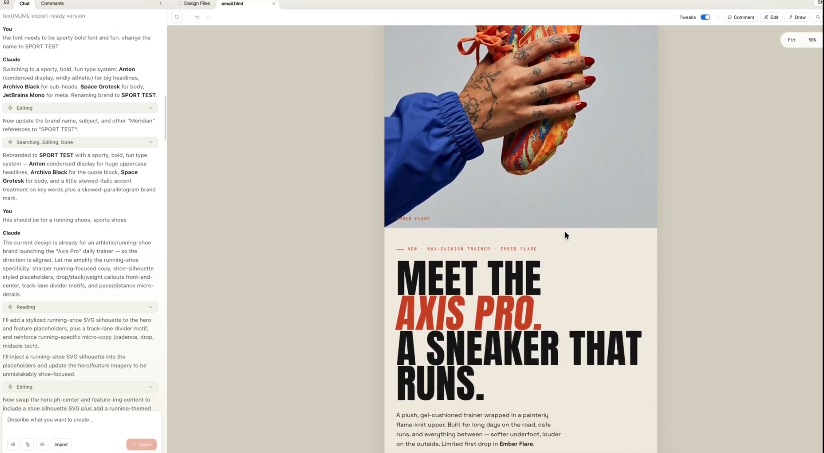
Come utilizzare Claude Design (flusso di lavoro semplice)
In passato, molti strumenti basati sull’intelligenza artificiale andavano in tilt quando si trattava di apportare modifiche. Bastava dire “sposta il pulsante un po” più a sinistra” perché ricostruissero l’intera pagina, e a quel punto nemmeno tu la riconoscevi più.
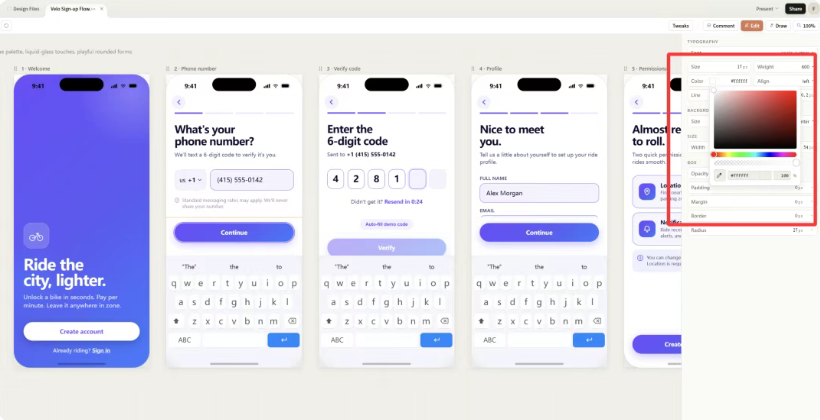
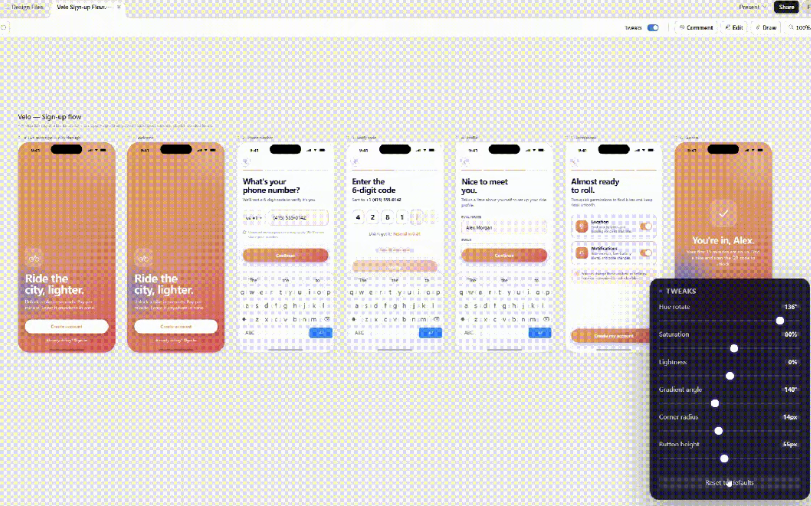
Claude Design offre direttamente quattro modalità di modifica personalizzabili, ciascuna delle quali affronta diversi punti critici reali.
Basta dire a Claude Design cosa modificare nella chat: è la cosa più semplice.
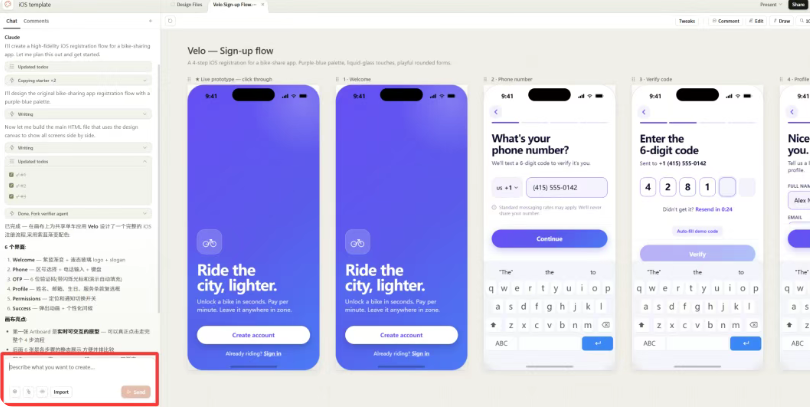
Puoi anche selezionare un elemento nel progetto e lasciare commenti proprio come faresti in Figma.

È possibile passare alla modalità di modifica, aprire il pannello delle proprietà sulla destra e regolare manualmente il tipo di carattere, la dimensione, il colore e la spaziatura.
La funzione più incredibile: Claude Design genera automaticamente dei cursori di regolazione in base al tuo progetto — intensità dei colori del tema, spaziatura, velocità dell'animazione — basta trascinarli finché non trovi l'effetto giusto.
E una volta terminato, puoi esportarlo in formato PDF o PPTX, oppure inviarlo a Canva con un solo clic per perfezionarlo ulteriormente.
L'amministratore delegato di Canva ha espresso pubblicamente il proprio sostegno il giorno del lancio: le due aziende hanno stretto una partnership ufficiale.
Claude Design: una vera e propria arma per la produttività
Ancora più incisivo: il progetto può essere impacchettato e consegnato con una sola istruzione per Claude Code, e l'IA trasforma il progetto in codice eseguibile.
Dall’idea nella tua mente → prototipo interattivo → prodotto pronto per il lancio, Claude Design collega l’intero percorso, rappresentando un cambiamento epocale simile all’evoluzione dalla codifica delle vibrazioni alla codifica dei desideri.
Ora una sola persona può fare ciò che prima richiedeva tre persone.
Non è necessario conoscere Figma, e non è nemmeno necessario conoscere programmazione intuitiva. Devi solo sapere cosa vuoi, e Claude Design penserà a tutto il resto.
Quello che otteniamo è un codice dei componenti già iterato e pronto all'uso: non è più necessario ricreare i mockup.
Gli aspetti negativi di Claude Design che dovresti conoscere: prezzi e limiti
Naturalmente, ci sono delle insidie.
Claude Design esaurisce rapidamente i limiti di utilizzo. PCWorld lo ha testato: gli utenti Pro ($20/mese) L'ho usato per circa 30 minuti e ho praticamente esaurito la quota di un'intera settimana.
Motivo: Claude Design funziona su Opus 4.7, l’ultimo modello di punta di Anthropic. Ogni interazione consuma un’enorme quantità di token, sebbene la sua struttura profonda pensiero adattivo garantisce che la qualità della logica dell'interfaccia utente generata sia incredibilmente elevata.
Su Reddit, gli utenti si lamentano del fatto che bastino solo due o tre prompt completi per esaurire la quota settimanale.
La cosa positiva è che l'utilizzo della funzione "Design" viene calcolato separatamente rispetto alla chat e a Claude Code, quindi non si sovrappongono.
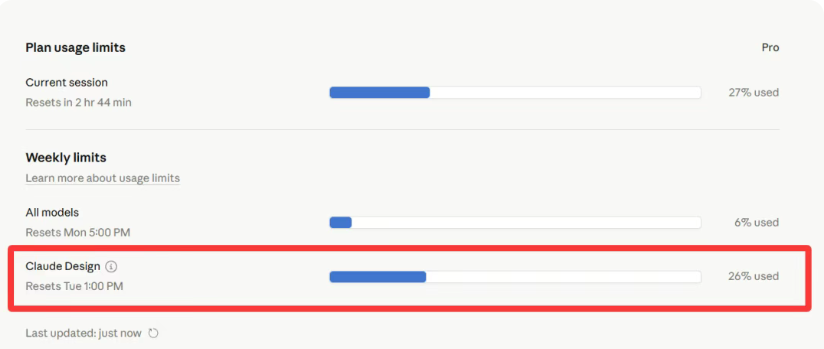
Ma se sei un utente Pro, devi davvero pianificare il tuo utilizzo: non buttarti subito in progetti di grandi dimensioni.
Un altro problema: molti utenti su Reddit sostengono che, se non si carica il proprio sistema di design, i risultati generati da Claude Design tendono ad assomigliarsi tra loro: caratteri serif, barre di evidenziazione colorate, layout a schede sovrapposte.
Quindi, se vuoi utilizzare Claude Design nel tuo lavoro quotidiano, la prima cosa da fare è fornirgli i colori, i caratteri e gli stili dei componenti del tuo marchio, in modo che possa imparare il tuo linguaggio visivo.
Claude Design vs Figma: cosa cambia
Il fossato di Figma è l'ecosistema di collaborazione costruito in 10 anni - librerie di componenti, flussi di lavoro di gruppo. Claude Design non può ancora sostituirlo.
Ma a lungo termine, il vero impatto di Claude Design è l'intercettazione.
La prossima ondata di fondatori, PM, marketer, che potrebbero essere diventati utenti di Figma, potrebbero iniziare direttamente con Claude Design fin dal primo giorno, senza dover imparare Figma.
Ciò che Figma rischia di perdere è la crescita futura.
Chi dovrebbe utilizzare Claude Design
Claude Design è particolarmente utile se siete:
- Un fondatore di startup che ha bisogno di prototipi rapidi
- Un product manager che vuole visualizzare velocemente le idee
- Un marketer che costruisce landing page o pitch deck
- Un non designer che vuole solo qualcosa di bello da vedere
Se si dispone già di un solido flusso di lavoro di progettazione all'interno di Figma, il passaggio potrebbe non essere immediato.
Ma se si parte da zero, Claude Design è un punto di ingresso molto diverso.
Controllo dello stile nel design Claude
Un problema reale in questo momento è la coerenza.
Molti utenti su Reddit sostengono che, senza caricare il proprio sistema di progettazione, i risultati di Claude Design tendono ad assomigliarsi: font di tipo ferif, barre di evidenziazione colorate, layout di schede impilate.
Quindi, se volete usare Claude Design nel lavoro reale, la prima cosa da fare è dargli i colori, i caratteri e gli stili dei componenti del vostro marchio.
Una volta appreso il vostro linguaggio visivo, i risultati si avvicinano molto di più a qualcosa di utilizzabile.
Il Claude Design sostituirà i designer?
Non immediatamente.
Il design non si limita a generare layout, ma riguarda i sistemi, la collaborazione e l'iterazione a lungo termine.
Ma ciò che Claude Design fa è abbassare enormemente la barriera.
Molto lavoro di progettazione “sufficientemente buono”, in particolare i prototipi in fase iniziale, le pagine di marketing, i documenti interni, può ora essere svolto senza un designer dedicato.
Questo spostamento, da solo, è sufficiente.
Suggerimenti pratici sul design di Claude
Un sacco di lavoro non può più tornare indietro. Il vecchio metodo - invio di file avanti e indietro, allineamento costante, scambio di tempo per i risultati - è praticamente morto.
Questa volta è stato colpito un intero modo di lavorare a cui la gente era abituata.
Anthropic ha usato Claude Code per conquistare gli sviluppatori, ora con Claude Design si rivolge a creatori e product manager.
Trasformare le idee in realtà non è mai stato così facile.
Se avete già provato Claude Design, descrivete la vostra sensazione in una parola?