¿Se ha enfriado el “pequeño cangrejo de río”?
OpenClaw, que se hizo popular de repente en toda China a principios de 2026, parece que ya ha perdido fuelle.
Algunos amigos míos que solían pasar la noche en vela modificando OpenClaw lo han dejado de lado sin hacer mucho ruido. Este proyecto, del que en su día se decía que había irrumpido en GitHub a una velocidad pocas veces vista, ahora ha perdido casi por completo el interés que despertaba.
Quizás OpenClaw ya haya cumplido su misión histórica.
Llegó como un huracán y, por primera vez, puso de relieve ante el gran público el paradigma de los «agentes». Hizo que mucha gente se diera cuenta de una cosa: la IA no es solo un chatbot que habla contigo. También puede tomar la iniciativa y ayudarte a realizar tu trabajo.
Pero OpenClaw no se convirtió en Linux.
Avanzó demasiado rápido. Antes de que tuviera tiempo suficiente para crear barreras de código sólidas y un ecosistema robusto, ya había sido arrastrado hasta la playa.
Entonces, para aquellas personas que realmente necesitan los «Agents» para mejorar su productividad, ¿qué nueva herramienta están utilizando ahora?
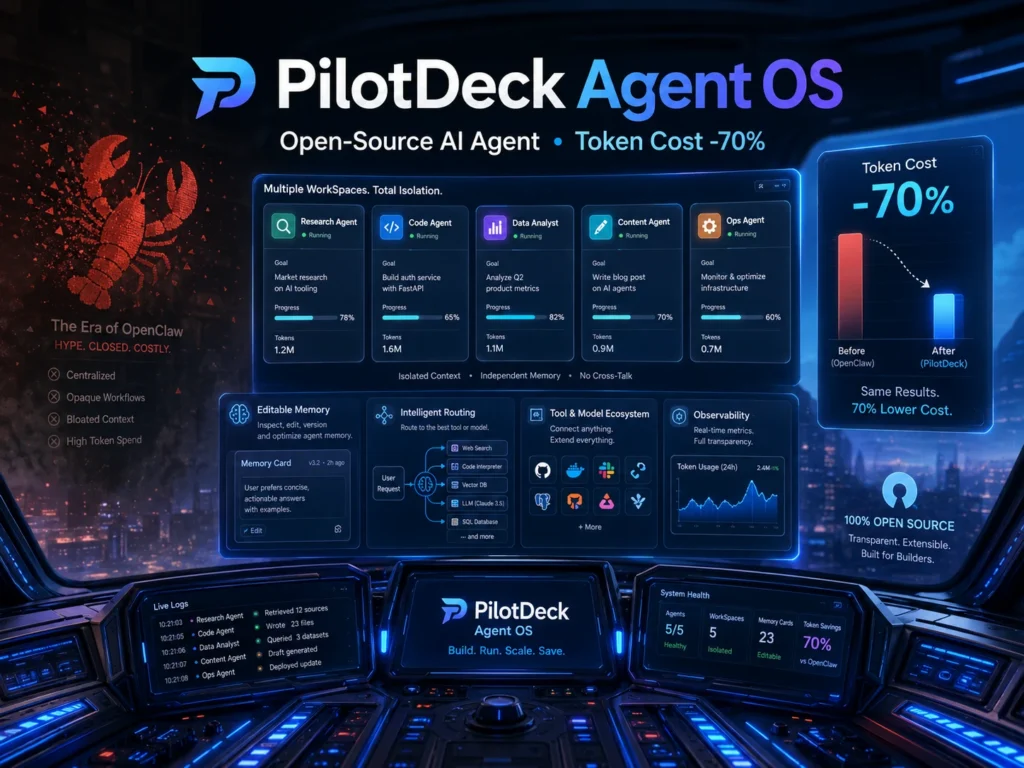
Recientemente, se ha presentado un sistema operativo para agentes inteligentes llamado PilotDeck Se puso en marcha discretamente en la comunidad. Fue desarrollado conjuntamente y publicado como código abierto por el Laboratorio THUNLP de la Universidad de Tsinghua, ModelBest, OpenBMB y AI9stars.
Si OpenClaw es un “juguete gigante” para frikis románticos, entonces este “mejor estudiante de Tsinghua” se parece más a un panel de control de colaboración entre agentes diseñado para una productividad real.
Sistema operativo PilotDeck Agent: de «Milk Tea Game» al panel de control de datos
¿En qué se diferencia PilotDeck de aquellos primeros «Agentes» que solo se quedaban en lo superficial?
Veamos algunas pruebas muy directas.
Abrimos dos WorkSpaces al mismo tiempo. Uno se utilizó para crear un juego y el otro, para la visualización de datos.
Entonces los pusimos a funcionar juntos, solo para ver si aguantaba.
Creación de un juego de simulación de una tienda de té con leche
En el primer WorkSpace, introdujimos una frase:
“Crea un pequeño juego de simulación de gestión para una tienda de té con leche. Debe incluir sistemas de compras, fijación de precios y gestión de colas. Los clientes decidirán si compran o no en función del precio y la reputación”.”
Una vez introducida la indicación, PilotDeck generó un plan muy detallado para el juego de simulación de una tienda de té con leche.
Desglosó el ciclo central del diseño del juego, diseñó una línea de productos con cinco tipos de té con leche y creó, además, el sistema de compras, el sistema de precios, el sistema de clientes y colas, el sistema financiero, etc.
En el aspecto técnico, ya había planificado con antelación un nuevo diseño de interfaz de usuario tipo «tarjeta» y había escrito los módulos clave de JavaScript y los pasos de implementación.
Al final, se podría jugar en línea a un juego sobre una tienda de té con leche.
Creación de un panel interactivo de financiación de la IA
El segundo WorkSpace tomó un rumbo totalmente diferente.
“Aquí tienes un conjunto de datos sobre la financiación de empresas de IA a nivel mundial. Ayúdame a crear un panel interactivo de visualización de datos. Debería incluir efectos de animación y, al pasar el ratón por encima, deberían mostrarse los detalles”.”
En esta tarea, PilotDeck utilizó cuatro gráficos para mostrar las diez principales empresas por importe total de financiación, la proporción de financiación correspondiente a América del Norte, Europa y Asia, y la distribución entre las categorías de IA general, IA empresarial e IA generativa.
El panel de visualización final mostraba claramente los datos de financiación de las empresas de IA en diferentes regiones.
Las dos tareas se ejecutaron al mismo tiempo.
Una de ellas consistía en programar la lógica del juego.
La otra consistía en trazar gráficos.
No se interferían entre sí.
Cómo elaborar un test de personalidad para programadores
Después de eso, añadimos otra actividad puramente lúdica.
“Crea un test de personalidad para programadores con 10 preguntas. Debe evaluar qué tipo de programador eres e incluir una página de resultados y una tarjeta para compartir”.”
PilotDeck generó 10 preguntas de opción múltiple que se acercaban bastante a situaciones reales de desarrollo. Dividió los resultados en 6 tipos:
Arquitecto 🏛️ / Ladrillero 🧱 / Perfeccionista ✨ / Mago 🧙 / Evangelista 📣 / Filósofo 🤔
El estilo visual utilizaba el tema oscuro de GitHub y la fuente monoespaciada Mono de JetBrains. Desprendía un marcado aire tecnológico.
Tras responder a las 10 preguntas, el resultado final reveló que, efectivamente, era un «Brick Mover».
Desde un juego de gestión hasta un panel de control de datos, pasando por una pequeña aplicación social, la variedad es, sinceramente, un poco exagerada.
Sin embargo, en PilotDeck, cada proyecto es un «WorkSpace» independiente. Cada uno ejecuta su propia tarea.
PilotDeck WorkSpace: mucho más que el aislamiento de carpetas
Una vez terminadas las tareas, hicimos algo más interesante.
Abrimos los paneles «Memory» de los dos proyectos por separado.
En el proyecto de la tienda de té con leche, la memoria almacenaba la lógica del juego, el estilo de la interfaz de usuario y los parámetros de juego.
En el proyecto del panel de control de datos, la memoria almacena los tipos de gráficos, las combinaciones de colores y la lógica de procesamiento de datos.
No había ni un solo recuerdo que se solapara entre ambos.
Probablemente, esta sea la diferencia más fundamental entre PilotDeck WorkSpace y muchas otras herramientas.
Claude Cowork ha introducido “Projects” para aislar los proyectos, y Cursor también cuenta con «Workspace». Sin embargo, su aislamiento sigue pareciéndose más a una combinación de «carpeta + reglas».”
Es difícil ver y modificar la memoria. Las habilidades no evolucionan realmente a medida que se utilizan más. Y no queda muy claro qué proyecto ha supuesto qué coste.
PilotDeck construye una “cabina de trabajo” completa para cada proyecto. En el interior de esta cabina hay tres niveles.
Sistema de archivos dedicado
Los archivos que pertenecen a este proyecto y lo que ha generado la IA están claramente separados.
Memoria dedicada
«Project Memory» registra la definición y el avance del proyecto.
La función «Comentarios sobre la colaboración» guarda tus preferencias.
Todos ellos pueden consultarse, modificarse y rastrearse hasta sus fuentes.
Habilidades específicas
La tienda de aplicaciones Skill permite instalar habilidades en el WorkSpace correspondiente con un solo clic.
Por ejemplo, instala buscador-de-recursos-para-videojuegos en el entorno de desarrollo de videojuegos WorkSpace e instala minimax-pdf al espacio de trabajo de redacción de documentos.
Otros espacios de trabajo pueden estar formados por carpetas y reglas estáticas.
El WorkSpace de PilotDeck se asemeja más a un entorno de vida completo para la IA.
Enrutamiento de tokens de PilotDeck: menor coste sin perder resultados
Las herramientas para agentes tienen un secreto a voces.
Son muy cómodas de usar, pero cuando llega la factura, puede dar un susto.
Ejecutar el modelo más potente para toda la tarea consume tokens muy rápido. A veces parece más caro que coger un taxi.
Una solución habitual es cambiar de modelo manualmente. Utiliza un modelo más económico para preguntas sencillas y cambia a uno más caro para tareas complejas.
Pero este cambio en sí mismo también resulta molesto.
PilotDeck utiliza un conjunto de algoritmos de enrutamiento inteligente, y su enfoque no es exactamente el mismo que el de las soluciones habituales del mercado.
Enrutamiento por subagente en lugar de por solicitud
Aquí es donde se toma la decisión de diseño más importante.
Muchas soluciones de enrutamiento asignan los modelos a nivel de solicitud. Cada solicitud se evalúa por separado y, a continuación, se le asigna un modelo.
El problema es que cambiar de modelo con frecuencia puede estropear la caché KV. Es como si cambiar de modelo implicara volver a leer el archivo cada vez. De hecho, la eficiencia de la inferencia podría reducirse.
PilotDeck realiza el enrutamiento a nivel de subagente.
Una vez que una tarea compleja se divide en varias subtareas, se asigna un subagente completo a cada modelo y este se ejecuta hasta el final. La caché de contexto dentro de este subagente se mantiene continua.
Así pues, lo que se ahorra no es solo el coste de los tokens, sino también la pérdida de rendimiento provocada por los cambios constantes.
Reglas de enrutamiento flexibles para diferentes tareas
PilotDeck también es más flexible que las reglas de enrutamiento fijas, como “los modelos caros realizan tareas complejas, mientras que los modelos baratos realizan tareas sencillas”.”
Admite reglas y indicaciones para ajustar la estrategia de enrutamiento.
Puedes definir qué tipo de tarea debe utilizar cada modelo. Incluso puedes indicárselo en lenguaje natural:
“Las subtareas relacionadas con el código utilizan Claude Opus, mientras que el procesamiento de texto utiliza un modelo más económico”.”
Abre el panel «Enrutamiento» y verás todas las sesiones claramente detalladas: si se consideran complejas, sencillas o de dificultad media, cuánto han costado realmente y cuánto habrían costado sin el enrutamiento.
Por ejemplo, en la aplicación del test de personalidad para programadores, sin el enrutamiento habría costado $10,97. Una vez activado el enrutamiento, el coste real fue de solo $1,42.
Eso significa que se ahorraron $9,55, lo que equivale a unos 75%.
El equipo de investigación también lo probó a mayor escala.
En el ámbito de las redes sociales, como la generación de contenido en Xiaohongshu, el coste con enrutamiento fue de $2,83. Sin enrutamiento, el coste ascendió a $12,58. Esto supuso un ahorro de unos 70%.
En escenarios de tareas más complejas, como el procesamiento de podcasts multilingües, el análisis financiero y la documentación de código, la combinación del Sonnet 4.6 principal y el MiniMax-M2.7 secundario obtuvo un coste de $3,15, con una puntuación de 70,6.
El uso exclusivo de Sonnet 4.6 supuso un coste de $18,36, con una puntuación de 69,1.
El precio era solo una sexta parte, pero el resultado fue incluso un poco mejor.
Por supuesto, si lo único que te importa es obtener el mejor rendimiento, puedes desactivar el enrutamiento y utilizar el modelo más potente para todo el proceso.
La decisión sigue siendo tuya.
Modelos locales para la protección de la privacidad y el control de costes
El sistema de enrutamiento de PilotDeck también puede conectar modelos locales como subagentes.
Esto significa que los datos confidenciales no tienen por qué salir de tu propio ordenador.
Para algunas tareas, puede incluso decidir qué herramientas se necesitan e implementar automáticamente un modelo en el propio dispositivo para realizar el trabajo. Por ejemplo, en el procesamiento de podcasts multilingües, puede instalar VoxCPM por sí mismo para generar voz.
El modelo en la nube puede encargarse del procesamiento, y el modelo local, de la ejecución.
De esta forma, se abordan tanto el ahorro de costes como la privacidad.
Memoria de PilotDeck: abre el cerebro de la IA y edítalo
Hoy en día, la memoria de los agentes ya no es esa antigua «caja negra» total.
Sin embargo, en muchas herramientas, aún no está lo suficientemente claro qué recordaba la IA, cuándo lo recordaba y si lo recordaba correctamente.
WorkSpace de PilotDeck ofrece una respuesta diferente.
No se trata simplemente de abrir una carpeta. Se trata de abrir todo el entorno vital de un agente.
Abre el panel «Memoria»: cada memoria incluye una marca de tiempo, una ruta de origen y un tipo.
«Project Memory» recoge la definición fundamental del proyecto.
La función «Comentarios sobre la colaboración» guarda tus preferencias de entrega.
Si ha registrado algún dato incorrecto, puedes hacer clic en él y modificarlo.
Si se produce un conflicto de memoria, puedes eliminar directamente la memoria errónea.
No hace falta volver a iniciar la conversación, ni volver a introducir tus preferencias desde el principio.
Mecanismo onírico para la organización de la memoria
PilotDeck también cuenta con un mecanismo llamado Dream.
Durante los periodos de inactividad, la IA revisa y organiza automáticamente su propia memoria en segundo plano.
Funciona durante el día y digiere por la noche.
En el panel «Memoria», puedes ver el botón «Sueño de memoria» y el botón «Volver al último sueño».
Si Dream comete algún error, puedes volver al estado anterior con un solo clic.
El resultado final de la memoria de caja blanca es sencillo:
Cuanto más utilices la IA, más se adaptará a tus hábitos.
Tus preferencias se guardan en la memoria de comentarios. Puedes verlas y modificarlas.
No se trata de confiar en la IA para adivinar lo que quieres.
Dilo. Lo graba con claridad. La próxima vez, lo hace tal y como tú lo dices.
Por qué PilotDeck parece una auténtica herramienta de gestión de la productividad
Si echamos la vista atrás a la oleada de modelos de gran tamaño, desde los primeros ChatGPT que sorprendieron a todo el mundo hasta herramientas como OpenClaw, que pusieron a prueba los límites de las capacidades de los agentes como si se tratara de un juguete para frikis, la forma de los agentes ha ido cambiando muy rápidamente.
Pero solo cuando se resuelvan uno a uno problemas como el coste, el aislamiento y la memoria, los agentes podrán pasar realmente de ser una “demostración interesante” a convertirse en una “herramienta de productividad útil”.”
El WorkSpace independiente de PilotDeck, la memoria de tipo “white-box” controlable y su minuciosa estrategia de enrutamiento inteligente hacen que la idea de «una persona, un ejército de IA» parezca cada vez más cercana a la realidad.
Lo más importante es que este “guerrero hexagonal” no está restringido tras un costoso muro de pago para empresas.
Decidió ser totalmente de código abierto.
Ya se trate de la lógica de enrutamiento subyacente o de la arquitectura de Workspace, el código ya se ha publicado allí de forma abierta.
Así pues, si quieres experimentar cómo es ser un gestor que no interviene, o si quieres acceder al código fuente y modificar tu propio equipo cibernético, probablemente merezca la pena que le eches un vistazo en profundidad a PilotDeck.